Create an upload link, on your own domain
You send your client a link, they pick their files and upload them: no account, no app, on a phone too. The link carries your company name, for example upload.your-company.tld, and does not expire. The files are stored on servers in Germany until you delete them.
14-day free trial · No credit card required
How to create your upload link
-
Create your account
Try Littletug free for 14 days, with no credit card. Your upload page runs at once on yourname.littletug.cloud. You connect your own domain whenever you like.
-
Create the link and share it
Create an upload link, for example one per client or project, and send it by email or messenger. It also fits in your signature, in a quote or behind a button on your website.
-
Files arrive
Your client uploads and is done. You get an email, and the files wait in your account under the link they came through, until you need them.
What your client sees
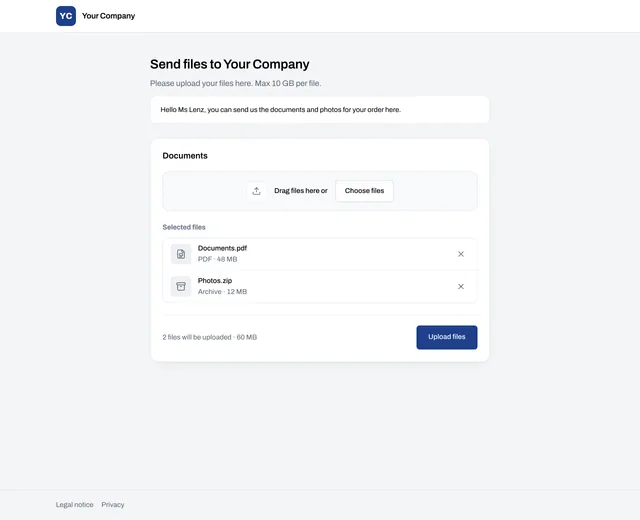
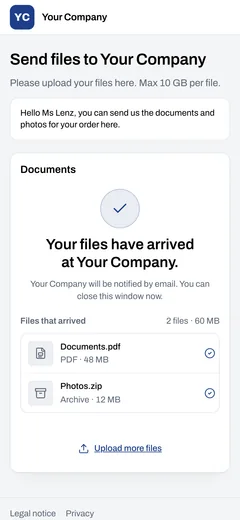
A page on your address, with your logo and your colours. Your client drags their files in or picks them, and uploads. Then they see the confirmation that the files have reached you.
If the connection drops, the upload carries on while the page stays open. The page speaks German or English, depending on the browser. You decide what your clients have to enter when they upload.
Your upload link at a glance
- Address
- your own domain, for example upload.your-company.tld, or yourname.littletug.cloud.
- Validity
- the link does not expire. It works until you deactivate it.
- File size
- up to 1 GB per file on Solo, up to 10 GB on Plus and Professional. Any number of files per upload.
- Protection
- a password per link if you want one. Every file up to 2 GB is checked for viruses after upload.
- Notification
- an email to you as soon as files have arrived.
- Storage
- encrypted, on servers in Germany. The files stay until you delete them. More about security and data protection
- Agreement
- the data processing agreement under Art. 28 GDPR is part of every plan.
- Price
- from €19 a month, net, for the whole account. Try free for 14 days.
Why not just a link from your cloud storage?
A link from a cloud storage or a transfer service leads to the provider's address and carries the provider's name. Nobody wants to explain someone else's tool to clients, and the questions about it land with you.
With Littletug, your name is in the address bar, your logo on the page and your colour on the button. Tax documents, building plans, print files: people would rather upload those to an address they know. The comparisons with Dropbox file requests, WeTransfer and FTP uploads show the differences in detail.
Frequently asked questions
How do I create an upload link?
You create an upload link in Littletug and pass it on, by email, by messenger or as a button on your website. Your client opens it in the browser and uploads their files. They need no account and no app for it.
Does an upload link expire?
No. An upload link works until you deactivate it. So you can keep the same link in your signature or on your website for good.
Do my clients need an account or an app?
No. A browser is enough, on a computer or a phone. You decide what your clients have to enter when they upload.
How large can the files be?
Up to 1 GB per file on Solo, up to 10 GB on Plus and Professional. An upload can hold any number of files, and your client sees the limit before picking files.
Can I protect the upload link with a password?
Yes, if you like. Every upload link can have a password. Without one, the link is enough.
Where are the uploaded files stored?
Encrypted, on servers in Germany, until you delete them. For your files, Littletug is a processor under Art. 28 GDPR; the agreement for it is part of every plan.
More about Littletug
- Sending large files: download links on your address instead of under a transfer service's name.
- Own domain and branding: your name, your logo and your colours, on every plan.
Littletug for tax advisers, architects, print shops and photographers.
Try Littletug free for 14 days.
On your own domain, with real uploads from your clients.