Send large files, on your own domain
You upload the file and pass on a download link. The link sits on your address and shows your logo, not the name of a transfer service. Your client downloads with no account and no app, and the file is stored on servers in Germany.
14-day free trial · No credit card required
Three ways to send large files
-
By email
Email gives up at around 20 MB. A video from a building site quickly reaches 4 GB.
-
By messenger
Messengers compress photos and videos. A photo of 8.4 MB turns into 212 KB, and it shows in print or in editing.
-
By download link
You upload the file once and send only the link. With Littletug, that link sits on your own domain.
How to create a download link
-
Upload the file
You upload the file in Littletug: up to 1 GB per file on Solo, up to 10 GB on Plus and Professional.
-
Share the link
You get a download link on your address, for example upload.your-company.tld/d/k7f2m, and send it by email or messenger. You can protect it with a password if you like.
-
Your client downloads
They open the link in the browser and download the file. They need no account and no app.
What your client sees
A download page on your address, with your name and your logo. It shows the file name, the size and, if you set a date, how long the link is valid. Your client sees at once who the file is from.
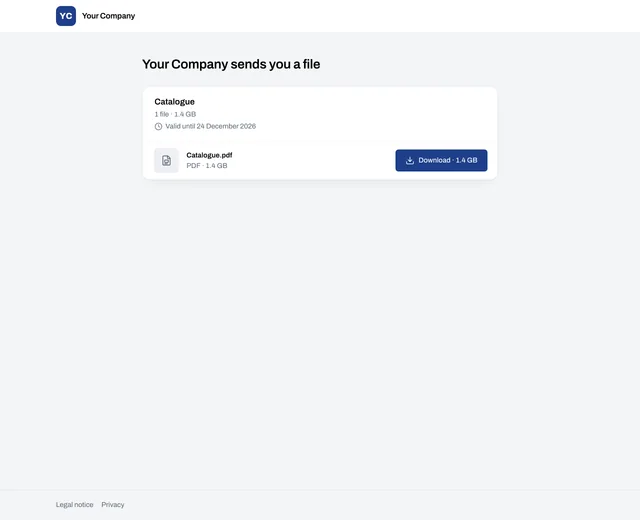
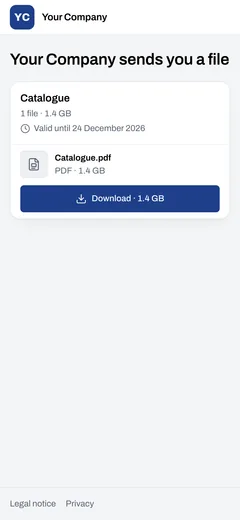
Your download link at a glance
- Address
- your own domain, for example upload.your-company.tld, or yourname.littletug.cloud.
- For the recipient
- no account, no app. A browser is enough, on a computer or a phone.
- File size
- up to 1 GB per file on Solo, up to 10 GB on Plus and Professional.
- Protection
- a password per link if you want one. You decide how long the link is valid. Without a date, it works until you deactivate it.
- Storage
- encrypted, on servers in Germany. More about security and data protection
- Receiving included
- through the same address, your clients send files to you, with your upload link.
- Price
- from €19 a month, net, for the whole account. Try free for 14 days.
Your name on the link
A link from a transfer service carries that service's name, and your client has to trust it first. A link on your domain shows at once who the file is from: your name in the address bar, your logo on the page.
Then there is where the file is stored: with Littletug always on servers in Germany, with the data processing agreement on every plan. The comparison with WeTransfer shows the difference in detail.
Frequently asked questions
How do I send large files?
You upload the file and send the link instead of the file. Email gives up at around 20 MB, and messengers compress photos and videos. With Littletug, the download link sits on your own domain.
How do I create a download link?
You upload the file in Littletug and get a download link on your address. You send the link by email or messenger. It can have a password if you like.
Does the recipient need an account?
No. They open the link in the browser and download the file, on a computer or a phone.
How large can the files be?
Up to 1 GB per file on Solo, up to 10 GB on Plus and Professional.
Can I protect the download link with a password?
Yes, if you like. Every download link can have a password. Without one, the link is enough.
Can I also receive files with Littletug?
Yes, that is what Littletug is built for. Your clients upload through your upload link, with no account and no app, and the files stay until you delete them.
More about Littletug
- Upload link: your clients upload files on your address, with no account and no app.
- Own domain and branding: your name, your logo and your colours, on every plan.
Littletug for tax advisers, architects, print shops and photographers.
Try Littletug free for 14 days.
On your own domain, with real uploads from your clients.